Continuing my experiments with our 2 Node 10g RAC Test system, I carried out upgrade of Oracle Clusterware and Oracle RAC Database from 10.2.0.1 to 10.2.0.4. I have tried to document the steps for upgrading Oracle Clusterware(Rolling Upgrade) and RAC Database upgrade in this post. In case you observe any mistakes, please let me know
First step is to download the 10.2.0.4 Patchset from metalink. In our case ,we downloaded Patch 6810189 (10g Release 2 (10.2.0.4) Patch Set 3 for Linux x86). You can follow Patch Readme for detailed steps.
We will be doing Rolling upgrade for Oracle Clusterware i.e we will only bring one node down for patching while other node will be available and accepting database connections. Before you start the process, take backup of following so as to restore it in case of failed upgrade
a) Full OS backup (as some binaries are present in /etc ,etc)
b) Full Database Backup (Cold or hot backup)
c) Backup of OCR and voting disk
Let’s begin it
1)Shutdown the DBconsole and Isqlplus
<span style="font-size: small; font-family: arial,helvetica,sans-serif;">$ emctl stop dbconsole
$ isqlplusctl stop
</span>
2) Shutdown the associated service on the node
<span style="font-size: small; font-family: arial,helvetica,sans-serif;">[oracle@blrraclnx1 ~]$ srvctl stop service -d orcl -s orcl_taf -i orcl1</span>
3) Shutdown Database Instance and ASM instance on node (if present)
<span style="font-size: small; font-family: arial,helvetica,sans-serif;">[oracle@blrraclnx1 ~]$  srvctl stop instance -d orcl -i orcl1
</span>
To stop ASM, use following command
<span style="font-size: small; font-family: arial,helvetica,sans-serif;">[oracle@blrraclnx1 ~]$ srvctl stop asm -n blrraclnx1
</span>
4)Next step is to stop Nodeapps services on the node
<span style="font-size: small; font-family: arial,helvetica,sans-serif;">[oracle@blrraclnx1 ~]$ srvctl stop nodeapps -n blrraclnx1</span>
Before proceeding to installing Oracle Clusterware Patch, let’s confirm if services have been stopped
HA Resource                                   Target     State
-----------                                   ------     -----
<strong>ora.blrraclnx1.ASM1.asm                       OFFLINE    OFFLINE
ora.blrraclnx1.LISTENER1_BLRRACLNX1.lsnr      OFFLINE    OFFLINE
ora.blrraclnx1.gsd                            OFFLINE    OFFLINE
ora.blrraclnx1.ons                            OFFLINE    OFFLINE
ora.blrraclnx1.vip                            OFFLINE    OFFLINE</strong>
ora.blrraclnx2.ASM2.asm                       ONLINE     ONLINE on blrraclnx2
ora.blrraclnx2.LISTENER1_BLRRACLNX2.lsnr      ONLINE     ONLINE on blrraclnx2
ora.blrraclnx2.gsd                            ONLINE     ONLINE on blrraclnx2
ora.blrraclnx2.ons                            ONLINE     ONLINE on blrraclnx2
ora.blrraclnx2.vip                            ONLINE     ONLINE on blrraclnx2
ora.orcl.db                                   ONLINE     ONLINE on blrraclnx2
<strong>ora.orcl.orcl1.inst                           OFFLINE    OFFLINE</strong>
ora.orcl.orcl2.inst                           ONLINE     ONLINE on blrraclnx2
ora.orcl.orcl_taf.cs                          ONLINE     ONLINE on blrraclnx2
<strong>ora.orcl.orcl_taf.orcl1.srv                   OFFLINE    OFFLINE</strong>
ora.orcl.orcl_taf.orcl2.srv                   ONLINE     ONLINE on blrraclnx2
5)Set DISPLAY variable and execute runinstaller from Patch Directory
<span style="font-size: small; font-family: arial,helvetica,sans-serif;">[oracle@blrraclnx1 Disk1]$ ./runInstaller
</span>
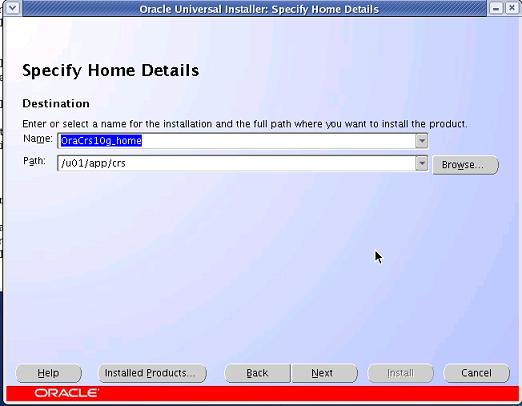
This will open OUI screen. Select Oracle Clusterware Home for Patching. Find below screenshot for same

This will automatically select all the nodes available in cluster and propogate patch binaries to the other node.

6) On the Summary screen, click Install.OUI will prompt you now to run, following two scripts as Root which will upgrade Oracle Clusterware
<span style="font-size: small; font-family: arial,helvetica,sans-serif;"># $ORA_CRS_home/bin/crsctl stop crs
# $ORA_CRS_home/install/root102.sh
</span>
Now we need to repeat the steps 1-4 and step 6 on Node 2. Step 5 is not required as binaries have been already copied over to node 2.
RAC Database Patching cannot be done in a rolling fashion and requires Database to be shutdown.
1)Shutdown the DBconsole and Isqlplus
<span style="font-size: small; font-family: arial,helvetica,sans-serif;">$ emctl stop dbconsole
$ isqlplusctl stop

</span>
2) Shutdown the associated service for database
<span style="font-size: small; font-family: arial,helvetica,sans-serif;">[oracle@blrraclnx1 ~]$ srvctl stop service -d orcl </span>
3) Shutdown Database Instance and ASM instance on node (if present)
<span style="font-size: small; font-family: arial,helvetica,sans-serif;">[oracle@blrraclnx1 ~]$  srvctl stop database -d orcl
</span>
To stop ASM, use following command on both the nodes
<span style="font-size: small; font-family: arial,helvetica,sans-serif;">[oracle@blrraclnx1 ~]$ srvctl stop asm -n blrraclnx1 </span><span style=\"font-size: small; font-family: arial,helvetica,sans-serif;\">[oracle@blrraclnx1 ~]$ srvctl stop asm -n blrraclnx2</span>
4)Next step is to stop Listener on both the nodes
<span style="font-size: small; font-family: arial,helvetica,sans-serif;">[oracle@blrraclnx1 ~]$ srvctl stop listener -n blrraclnx1 -l LISTENER1_BLRRACLNX1
</span><span style="font-size: small; font-family: arial,helvetica,sans-serif;">[oracle@blrraclnx1 ~]$ srvctl stop </span><span style="font-size: small; font-family: arial,helvetica,sans-serif;">listener</span><span style="font-size: small; font-family: arial,helvetica,sans-serif;"> -n blrraclnx2 -l LISTENER1_BLRRACLNX2
</span>
5)Set DISPLAY variable and execute runinstaller from Patch Directory
<span style="font-size: small; font-family: arial,helvetica,sans-serif;">[oracle@blrraclnx1 Disk1]$ ./runInstaller
</span>
This will open OUI screen. Select Database Home for Patching.

6) On the Summary screen, click Install.When prompted, run the $ORACLE_HOME/root.sh script as the root
user on both the nodes. On completion of this , we need to perform post installation steps.
7)Start listener and ASM Instance on both the nodes
<span style="font-size: small; font-family: arial,helvetica,sans-serif;">[oracle@blrraclnx1 ~]$ srvctl start listener -n blrraclnx1 -l LISTENER1_BLRRACLNX1
[oracle@blrraclnx1 ~]$ srvctl start listener -n blrraclnx2 -l LISTENER1_BLRRACLNX2
[oracle@blrraclnx1 ~]$ srvctl start asm -n blrraclnx1
[oracle@blrraclnx1 ~]$ srvctl start asm -n blrraclnx2</span>
8)For Oracle RAC Installation, we need to set CLUSTER_DATABASE=FALSE before upgrading
<span style="font-size: small; font-family: arial,helvetica,sans-serif;">[oracle@blrraclnx1 ~]sqlplus "/ as sysdba" SQL>startup nomount SQL> alter system set cluster_database=false scope=spfile; System altered. SQL>shutdown immediate; SQL>startup upgrade SQL>spool 10204patch.log SQL>@?/rdbms/admin/catupgrd.sql SQL>spool off</span>
Log file needs to be reviewed for any errors. catupgrd.sql took 42 minutes on my system. In case CLUSTER_DATABASE parameter is not set to False, you will get following error while starting database in upgrade mode
ORA-39701: database must be mounted EXCLUSIVE for UPGRADE or DOWNGRADE
We need to Restart the database now and run utlrp.sql.
<span style="font-size: small; font-family: arial,helvetica,sans-serif;">SQL> SHUTDOWN IMMEDIATE SQL> STARTUP SQL> @?/rdbms/admin/utlrp.sql</span>
Confirm whether Database has been upgraded successfully by querying DBA_REGISTRY;
select comp_name,version,status from dba_registry;
Now set Cluster_database parameter to TRUE and start Database
<span style="font-size: small; font-family: arial,helvetica,sans-serif;">SQL>alter system set cluster_database=true scope=spfile; SQL>Shutdown immediate; [oracle@blrraclnx1 ~]$ srvctl start database -d orcl [oracle@blrraclnx1 ~]$ srvctl start service -d orcl</span>
To upgrade DBConsole, run following command
<span style="font-size: small; font-family: arial,helvetica,sans-serif;">emca -upgrade db -cluster
</span>
This completes the upgrade process.
Sandeep
Fantastic Post Amit…keep up the good work !!!
Sandeep
Btw ..are there O/S prerequisites for the upgrade?
Amit
Sandeep,
I would recommend reading patch readme for details..generally for applying patchsets we do not have OS pre-requisites as these are taken care at time of base installation.
cheers
Amit
Inder
Why we need to stop the CRS on Node 1 which is initiating CRS. As per my knowledge, you don;t need to stop anything and at the very end we only need to stop crs on node basis to execute root102.sh
Amit
Inder,
I think I am also stopping the CRS only before running root102.sh (Step 6). Can you point the step where I have mentioned that we need to stop CRS on both nodes simultaneously.
Regards
Amit
vijay
Hi,
In clusterware upgradation, for node1 you did shutdown and then performed upgradation. After upgradation do we need to start up the node1 before shutting down the node2 for upgradation? or we require minimal downtime here?
vijay
Any update on above doubt?
Amit
I did this upgrade long back. As far as I remember , root102.sh will automatically start the CRS and other resources.
-Amit
Murali
Excellent article, Amit. The screenshots help tremendously. Oracle support should just repleace their “Readme” with your article. 🙂
Amit
Thanks Murali 🙂
-Amit
RajiReddy
Nice Article…It’s worth
csk
Hi,
I am doing Oracle 10g R2 RAC(10.2.0.3.0) Production Database upgrade to 10.2.0.5.0 shortly. We dont have test instance on RAC.
I am planning to do Non-Rolling upgrade as I have not Rolling upgrade. We have taken sufficient downtime.
Does any one of you have steps to Non-Rolling upgrade for Oracle 10g R2 RAC?
Rgds,
CSK
Saurabh Sood
csk,
In a non-rolling upgrade you can bring down complete oracle stack at once and start patching. Other than this the steps are same for patching.
Regards,
Saurabh Sood
Sid
Hi All, trying to install the patch set 10098816 on 11.2.0.1 on RHEL in RAC and ASM. Plan to do a out-of-place upgrade.
What are the detail steps ?
email – [email protected]
olu_jolly
very useful blog, just finished upgrading my rac database using your post, but an observation.
When i used alter system set cluster_database=false scope=spfile command i have having errors, so i used
alter system set cluster_database=false scope=spfile sid=’sid_name’
@shiv
When we down the ASM file system and listener on both nodes
the given step in 3
3) Shutdown Database Instance and ASM instance on node (if present)
[oracle@blrraclnx1 ~]$ srvctl stop database -d orcl
To stop ASM, use following command on both the nodes
[oracle@blrraclnx1 ~]$ srvctl stop asm -n blrraclnx1
[oracle@blrraclnx1 ~]$ srvctl stop asm -n blrraclnx2
4)Next step is to stop Listener on both the nodes
[oracle@blrraclnx1 ~]$ srvctl stop listener -n blrraclnx1 -l LISTENER1_BLRRACLNX1
[oracle@blrraclnx1 ~]$ srvctl stop listener -n blrraclnx2 -l LISTENER1_BLRRACLNX2
the application which are using the database not able to access the database.
If ASM is instance is down in RAC instance is also down,
because how may instance in RAC those all are using only one ASM instance and it considered as RAC database down.
This as a down time to RAC database.
Amit
hi Shiv,
As I mentioned in above line , you cannot upgrade database in rolling fashion. You can only upgrade oracle clusterware in rolling fashion and once done you need to bring db down and can run catupgrade.sql by again starting database
Regards
Amit
@shiv
In simple way i am asking
While upgrading do we need to bring down whole RAC instance or not, if not then while upgrading why downing the ASM instance and listener on both node means downing the whole RAC instance.
Amit
Yes, while upgrading database you need to bring down database. This has to be done when you run catupgrade.sql which requires you to start database with startup upgrade option